TimeNook Pro — Google Calendar OAuth Demo

For Google Calendar scope verification. Auto-playing slideshow — screen-record this page.

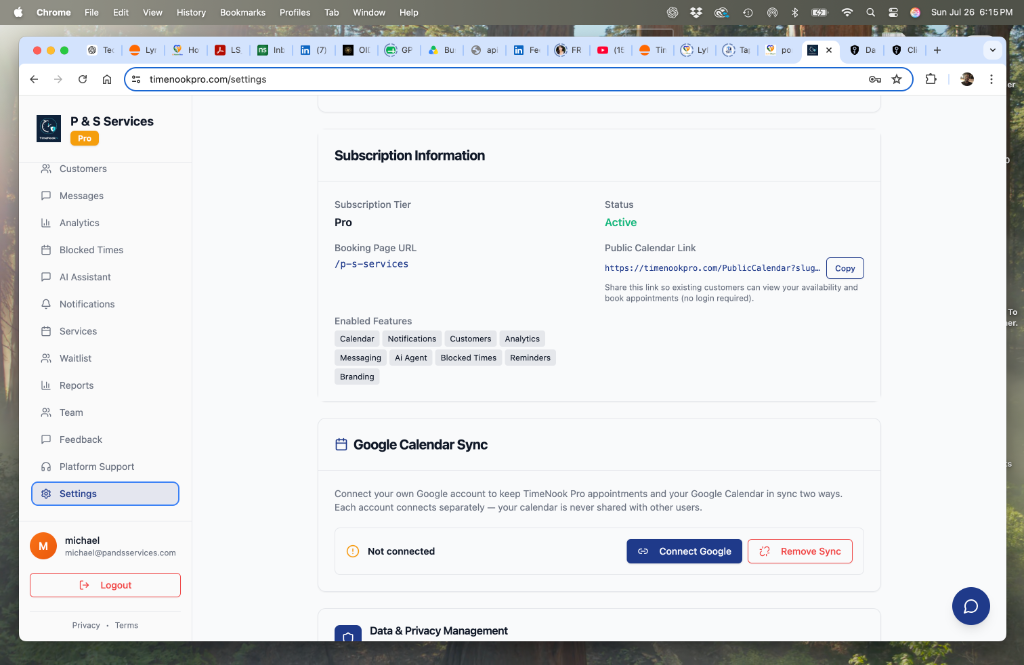
1. Settings Page — Google Calendar Sync Card
Slide 1 of 8

1. Settings Page — Google Calendar Sync Card

The business owner opens Settings. The Google Calendar Sync card shows the current 'Not connected' status, with a 'Connect Google' button and a 'Remove Sync' (disconnect) option. This is where the OAuth flow begins.

Easiest option: click Record Video above — it renders the full slideshow to a downloadable .webm file right in your browser (no screen recorder needed). Then upload that file to YouTube as Unlisted and paste the link in your Google Cloud verification request. Alternatively, screen-record the auto-playing slideshow below. Each slide shows ~7s.